How to Redesign Your Website Without Losing Rankings
A redesign should grow your traffic, not erase it. The five guardrails I follow on every website migration to keep your Google rankings safe.
Key Takeaways
- Redesigns kill rankings in four predictable ways: URLs change with no redirects, ranking copy gets replaced with pretty emptiness, the new site is slower, and pages get quietly dropped.
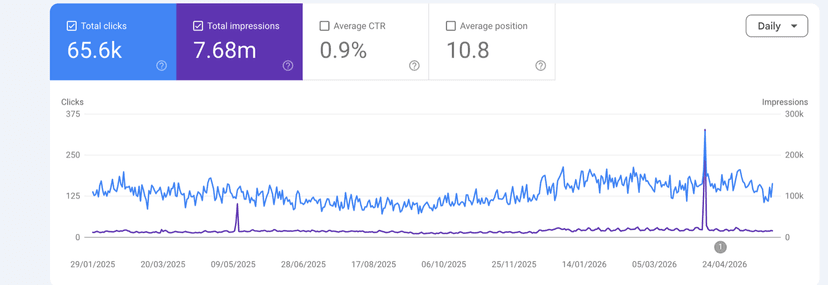
- Before anyone touches anything, screenshot your Search Console and export your full URL list. You cannot protect what you have not measured.
- Every old URL needs exactly one new home via a 301 redirect. No chains, no dumping everything on the homepage.
- Keep the copy that earns impressions. Google ranked the words, not the design.
- After launch, crawl your old URL list, confirm every one returns a 200 or a single 301, then watch Search Console daily for two weeks.
- A small wobble for a week or two is normal on big migrations. A sustained drop means a guardrail was missed, and there is a fixed order to check them in.
The fear is rational. You have spent years building up your Google traffic, your new site is going to look brilliant, and somewhere in the back of your mind is the story of a business that relaunched and watched their enquiries fall off a cliff.
That story is real. It happens constantly. I do website migrations for a living, moving clients from old WordPress builds to Shopify, rebuilding sites in Next.js, and rescuing the occasional disaster on a 123-reg account, and most ranking losses I see were caused by a redesign, not by an algorithm update.
The good news: every one of those losses was preventable, and the prevention is boring. There is no clever trick, just a short list of guardrails. Follow all of them and your rankings survive. I follow these exact steps on my own sites, including this one.
Why redesigns kill rankings
Google does not rank your website. It ranks individual pages, and it ranks them for specific words on those pages, reached through specific URLs, judged partly on how fast they load. A redesign can break all four of those things in one afternoon.
- URLs change with no redirects. Your services page moves from one address to another, nobody tells Google, and every ranking and backlink that page earned now points at a 404 error. This is the single biggest cause of post-redesign traffic loss.
- Keyword-bearing copy gets replaced by pretty emptiness. The old page had 800 words explaining exactly what you do. The new design has a big hero image and three short slogans. It looks great. Google now has almost nothing to rank.
- The new site is slower. Heavier images, more animation, more scripts. Speed is a ranking factor and a conversion factor, so a slower site loses twice.
- Pages get quietly dropped. "We don't need that old FAQ page" sounds harmless in a planning meeting. If that page was earning 300 clicks a month, you just deleted 300 clicks a month.
None of this is mysterious. Yet most of the redesign checklists ranking on page one right now tell you to set up 301 redirects and then move on. Almost none cover protecting the copy that ranks, catching a speed regression, or what to do when rankings drop anyway. So let's do all of it.
Before you touch anything: take your baseline
You cannot protect what you have not measured. This takes about 20 minutes and it is the cheapest insurance you will ever buy.
Screenshot Google Search Console. Open the Performance report, set the date range to the last 3 months, and screenshot four things: total clicks, total impressions, your top pages, and your top queries. Then do the same for the last 12 months, because seasonal businesses look very different across a year. Date the screenshots and put them somewhere safe.
Export your full URL list. Pull every URL Google knows about: the Pages report in Search Console, your XML sitemap, and ideally a crawl of the live site with a tool like Screaming Frog. Merge them into one spreadsheet. This list becomes your redirect map and your post-launch test script, so it needs everything: old blog posts, tag pages, that landing page from a 2022 campaign.
Know which pages earn your money. Cross-reference your top pages in Search Console with the pages that generate enquiries in your analytics. For most businesses it is a handful of pages doing most of the work. Mark them in the spreadsheet. These pages get the most careful treatment at every step that follows.
With the baseline done, here are the five guardrails.
Guardrail 1: Map every old URL to exactly one new home
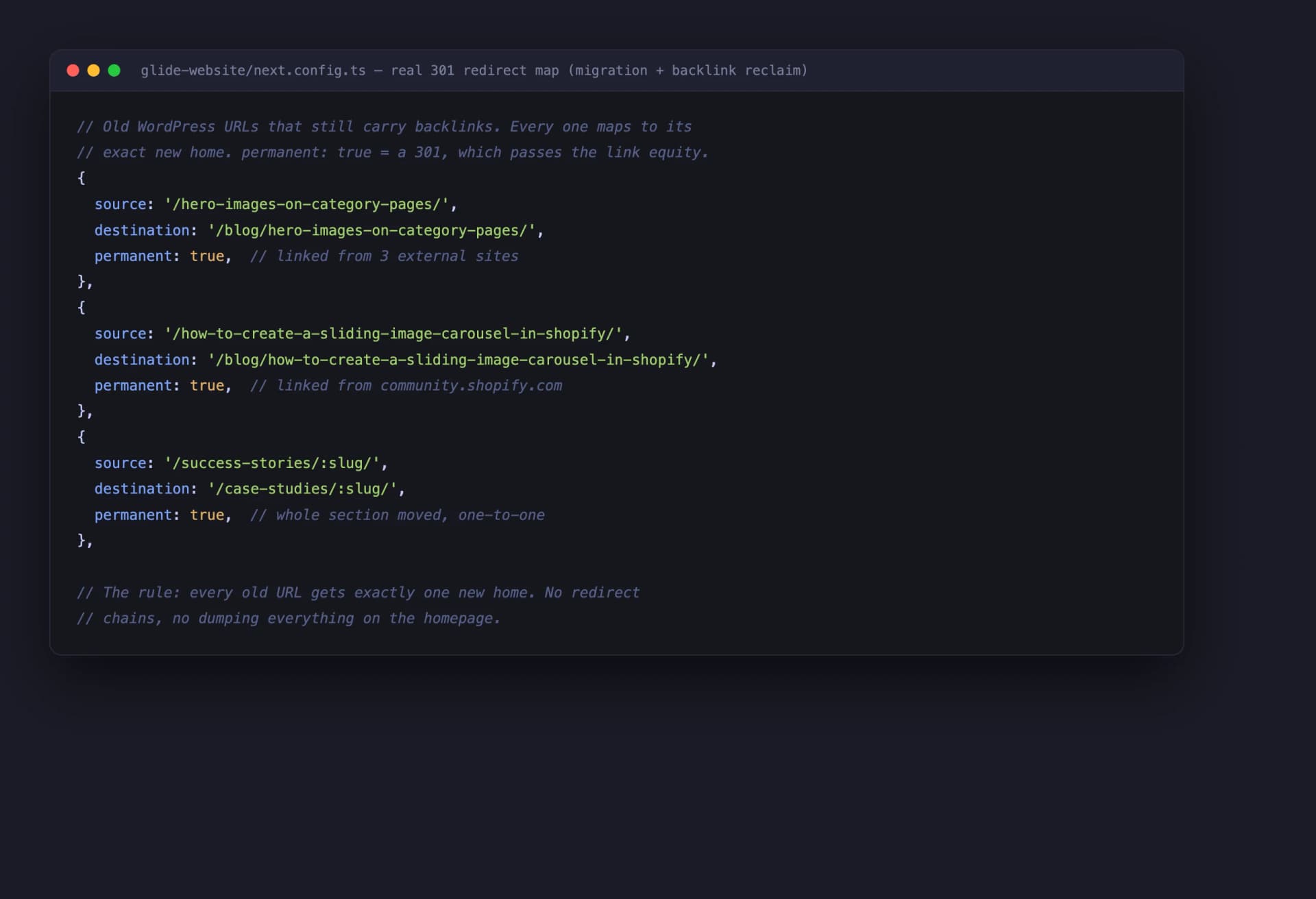
A 301 redirect is a permanent forwarding address. It tells Google "this page has moved here, transfer the rankings and the backlink value across". Every URL on your old site that changes or disappears needs one, and each needs to point at exactly one sensible destination.
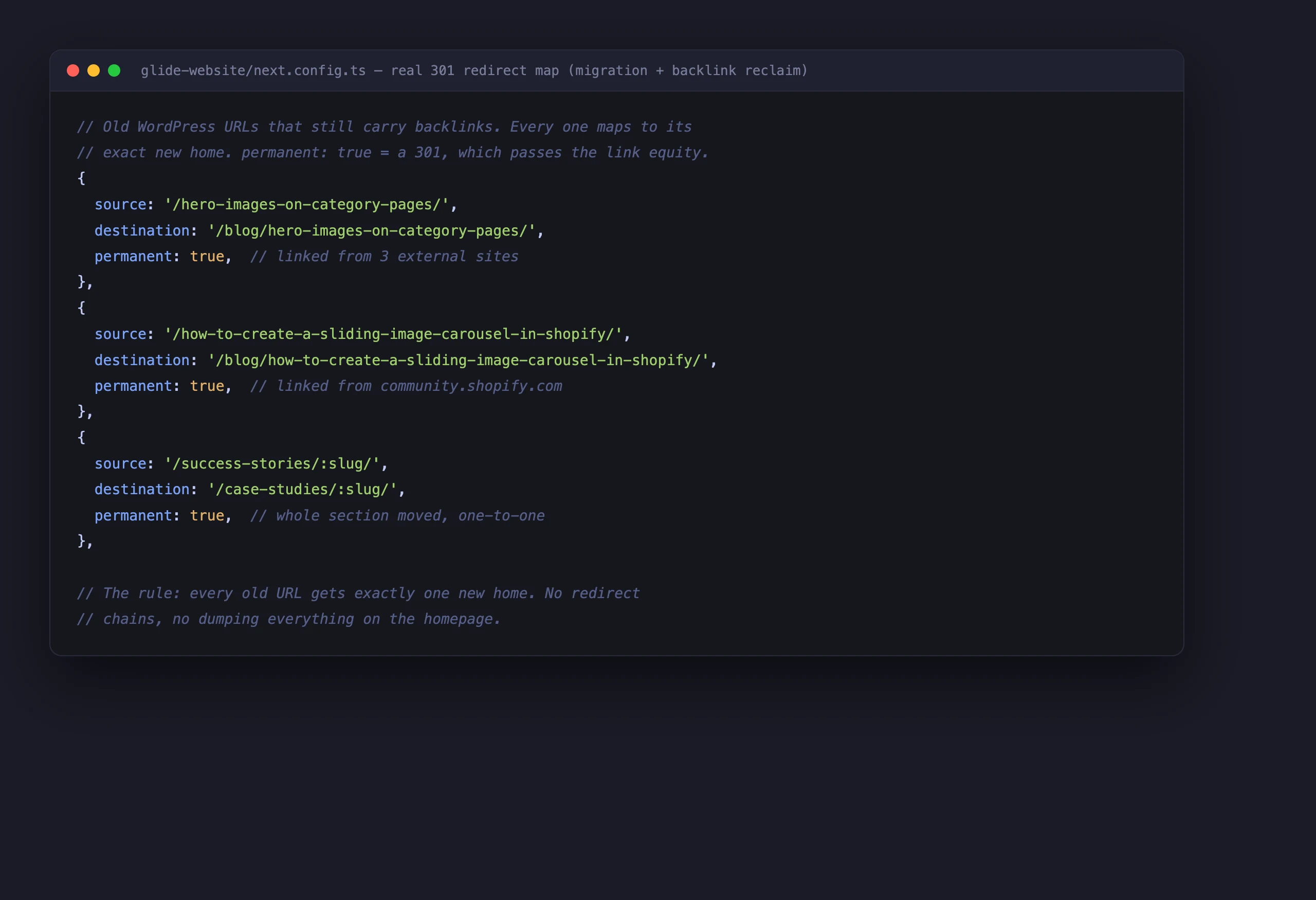
That image is not a mock-up. It is pulled from the codebase of the site you are reading right now, because we rebuilt this site too and followed our own rules. Every old WordPress URL maps one-to-one to its new address.
Two rules within the rule:
No chains. A redirect that points to another redirect that points to a third page leaks ranking value at every hop, and Google gives up after a few. Old URL, one 301, final destination. Done.
No dumping on the homepage. Redirecting 40 old pages to your homepage feels tidy, but Google treats it like a soft 404 and the ranking value mostly evaporates. Each old page should redirect to the page that best replaces it, or failing that, the closest relevant service or category page.
Guardrail 2: Keep the copy that ranks
This is the guardrail almost every redesign checklist misses. Google ranked your old page because of the words on it. Specific phrases, answered questions, detail that matched what people search for. If the new design replaces 800 useful words with a full-screen photo and a slogan, you have not redesigned the page. You have deleted it and put a poster up in its place.
Before any copy gets rewritten, open Search Console, click into each important page, and look at the Queries tab. Those are the exact words that page earns impressions for. Write them down. The new version of the page must still contain and properly cover those phrases. Redesign around the copy that earns, do not replace it with vibes.
You can absolutely improve copy during a redesign, and often you should. Tighten it, restructure it, make it more persuasive. That is the whole idea behind web design that converts: the design and the words working together to turn visitors into enquiries. But improving copy and discarding it are different jobs. Pretty but empty is a downgrade, and Google notices within weeks.
Guardrail 3: Keep titles, metas and heading structure
Page titles are one of the strongest on-page signals Google has, and they are routinely regenerated by whatever the new platform's defaults happen to be. The same goes for meta descriptions and headings. A redesign that silently swaps a title that ranked for years for an auto-generated one throws away earned trust for nothing.
The rule: every title, meta description and heading either stays the same or changes because you deliberately decided the new version is better. "The new theme did it" is not a decision.
Headings deserve special care because page builders love wrapping things in heading tags for styling, leaving you with five H1s and a structure that reads like a ransom note. One H1 per page, H2s for the main sections, H3s beneath them. I wrote a full guide to correct heading structure for SEO, but the short version is that your headings should outline the page like a contents list, and the new design must preserve that outline.
Guardrail 4: Protect your speed
The new site must be at least as fast as the old one. Not "feels fast on the designer's MacBook", measurably as fast, on a mid-range phone, on the kind of connection your customers have.
Test the old site with PageSpeed Insights before launch and record the scores next to your Search Console screenshots. Test the staging site the same way before you go live. If the new build is slower, that is a launch blocker, not a follow-up task, because speed problems are far easier to fix before launch than to diagnose afterwards while your rankings slide.
The usual culprits are predictable: enormous hero images that were never resized, every image loading at once instead of lazy-loading as you scroll, and a pile of scripts for animations nobody asked for. Images should be exported at the size they display, served in a modern format, and lazy-loaded below the fold. Clean, properly structured markup helps here too, and as a bonus it helps Google and AI tools read your pages. My semantic HTML guide covers how the underlying structure of a page affects all of this.
Guardrail 5: Re-verify after launch
Launch day is not the finish line. It is the start of the checking phase, and this is the step that turns "we think it went fine" into proof.
Remember that URL spreadsheet from your baseline? Within an hour of going live, crawl every URL on it against the live site. Every old URL must return either a 200 (the page still exists at the same address) or one 301 hop to its new home. Anything returning a 404, a redirect chain, or a 500 gets fixed that day, while Google has barely noticed. There are always one or two.
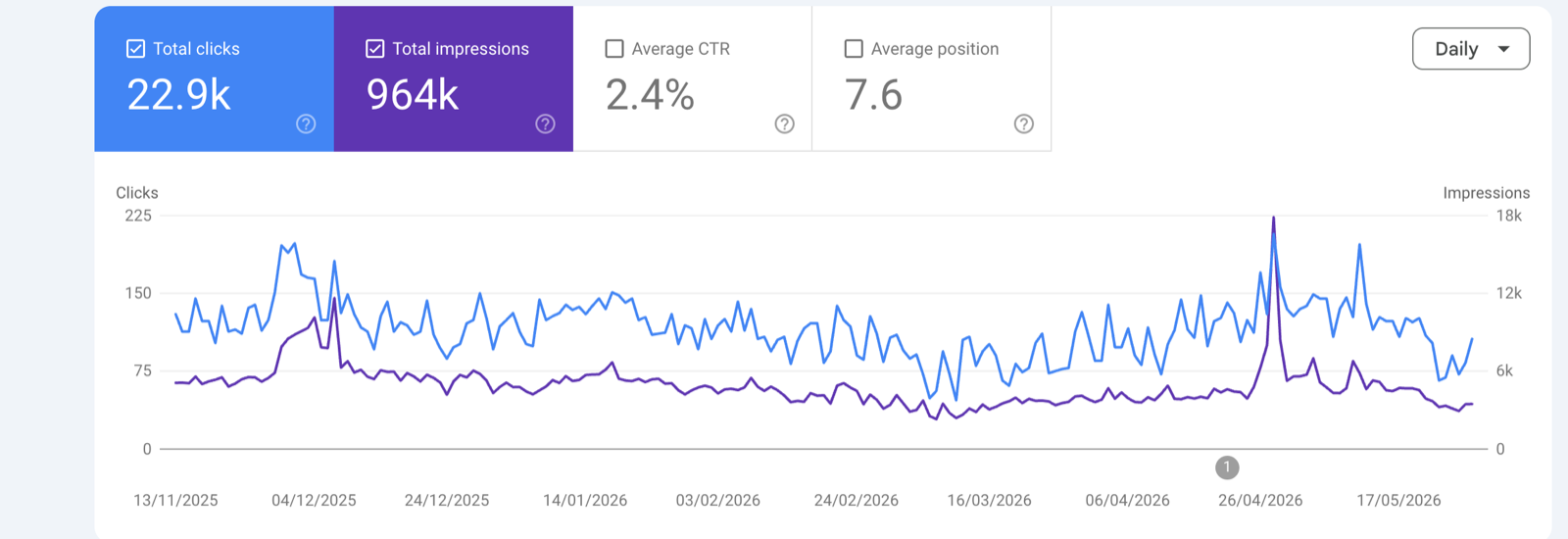
Then watch Search Console daily for two weeks. Clicks and impressions against your baseline screenshots, the Pages indexing report for any spike in "Not found" errors, and your money pages specifically. It takes five minutes with your morning coffee, and it is the difference between catching a problem on day 2 and discovering it a month later when the enquiries dry up.
When rankings do dip anyway
An honest section, because no one else seems to write one. On a big migration, a small wobble is normal. Google has to re-crawl and re-evaluate every page, and while it does, impressions can soften for a week or two. If you followed the guardrails, it comes back, usually within a month.
A sustained drop is different. If clicks are still well below baseline after three to four weeks, a guardrail was missed, and you triage in this order:
- Redirects first. Re-crawl the old URL list. Missing and chained redirects cause the majority of sustained drops, and they are the fastest to fix.
- Indexing second. Check the Pages report in Search Console for "Not found", "Redirect error" or a falling count of indexed pages. Also confirm nobody left a noindex tag or a blocked robots.txt on the new site. It happens more than anyone admits. If pages have simply stopped getting indexed since the move, I wrote a full guide on what to do when a new or moved site will not index.
- Copy third. Compare the dropped pages against their old versions (the Wayback Machine is your friend). If the words that earned the impressions are gone, put them back.
- Speed last. Re-run PageSpeed Insights against your pre-launch scores. A regression here causes slower, grindier declines rather than cliffs, but it still needs fixing.
Work the list in order, fix what you find, then give Google two to three weeks to re-process. Resist the urge to change ten things at once, because then you will never know what worked.
Who should do this?
If you run a five-page brochure site with modest traffic, you can genuinely do this yourself. The redirect map fits on one sheet of paper and the checking is free. Nothing in this post needs an agency, just patience.
If your website brings in a meaningful share of your revenue, the maths changes. A botched migration is not an inconvenience, it is months of lost income while you claw rankings back. This is exactly the unsexy, methodical work a good web design agency should be earning its fee on. The pretty part is the easy part.
And if you are choosing an agency for a redesign, here is a one-question filter: ask them to show you their redirect map process. Not describe it, show it. A real example from a real project, like the one earlier in this post. If they look blank, or say the developer handles that, keep looking. I wrote a fuller set of filter questions in my guide to what to ask an agency before you sign, and most of them apply to choosing a web designer too.
A redesign done properly is one of the best investments you can make, because you keep everything you have earned and add a site that converts better on top. Done carelessly, it burns years of work in a week. The difference is not talent or budget. It is whether somebody followed the boring list.
Mike McDonnell, Founder of Glide Marketing. More about how I work.
Frequently asked questions
Will redesigning my website hurt my SEO?
Only if it is done carelessly, which sadly is the default. Rankings drop when URLs change without redirects, when ranking copy gets deleted, when the new site is slower, or when pages get quietly dropped. Follow the guardrails (full redirect map, keep the copy that earns impressions, protect speed, re-verify after launch) and a redesign should hold or improve your traffic.
How long do rankings dip after a redesign?
On a big migration, a small wobble for one to two weeks is normal while Google re-crawls everything. If clicks are still well below your baseline after three to four weeks, something specific is broken, usually a missing redirect or deleted copy, and you should triage rather than wait.
Do I need redirects if my URLs are staying the same?
If every URL is genuinely identical, no. But check rather than assume. Platforms add and remove trailing slashes, change case, and restructure category paths without telling you. Crawl your old URL list against the new site before launch. If everything returns a 200, you are fine.
Can I change my domain name at the same time as a redesign?
You can, but I would not. Each change adds risk, and when traffic drops you will not know which change caused it. If you must do both, do them in stages: migrate the design first, let rankings settle for a month or two, then move the domain with its own redirect map and a change of address notice in Search Console.
How long should 301 redirects stay in place?
Treat them as permanent. Google has said redirects should stay live for at least a year for signals to fully transfer, but old URLs live on in bookmarks, emails and backlinks far longer than that. Redirect rules cost nothing to keep, so keep them.
Is moving platform, like WordPress to Shopify, riskier than a normal redesign?
Yes, because almost everything changes at once: URL structure, templates, page speed, sometimes the copy too. That makes the redirect map and the pre-launch crawl even more important. We do these migrations regularly and the process is the same, just with more URLs to check and zero room for shortcuts.
How do I know which of my pages earn money?
Open Google Search Console, look at the Pages report for the last 12 months, and cross-reference it with the pages that generate enquiries or sales in your analytics. Usually a handful of pages drive most of the value. Those pages get the most care in a redesign: same URL if possible, same copy, same headings, faster load.
Should I delete old blog posts during a redesign?
Not in the same breath as the redesign. Check each post in Search Console first. A post that looks stale to you may quietly earn impressions and backlinks. If a page truly earns nothing and serves nobody, you can retire it later with a redirect to the closest relevant page, as a separate, deliberate decision.