Semantic HTML for SEO: Structure Pages So Google Gets It
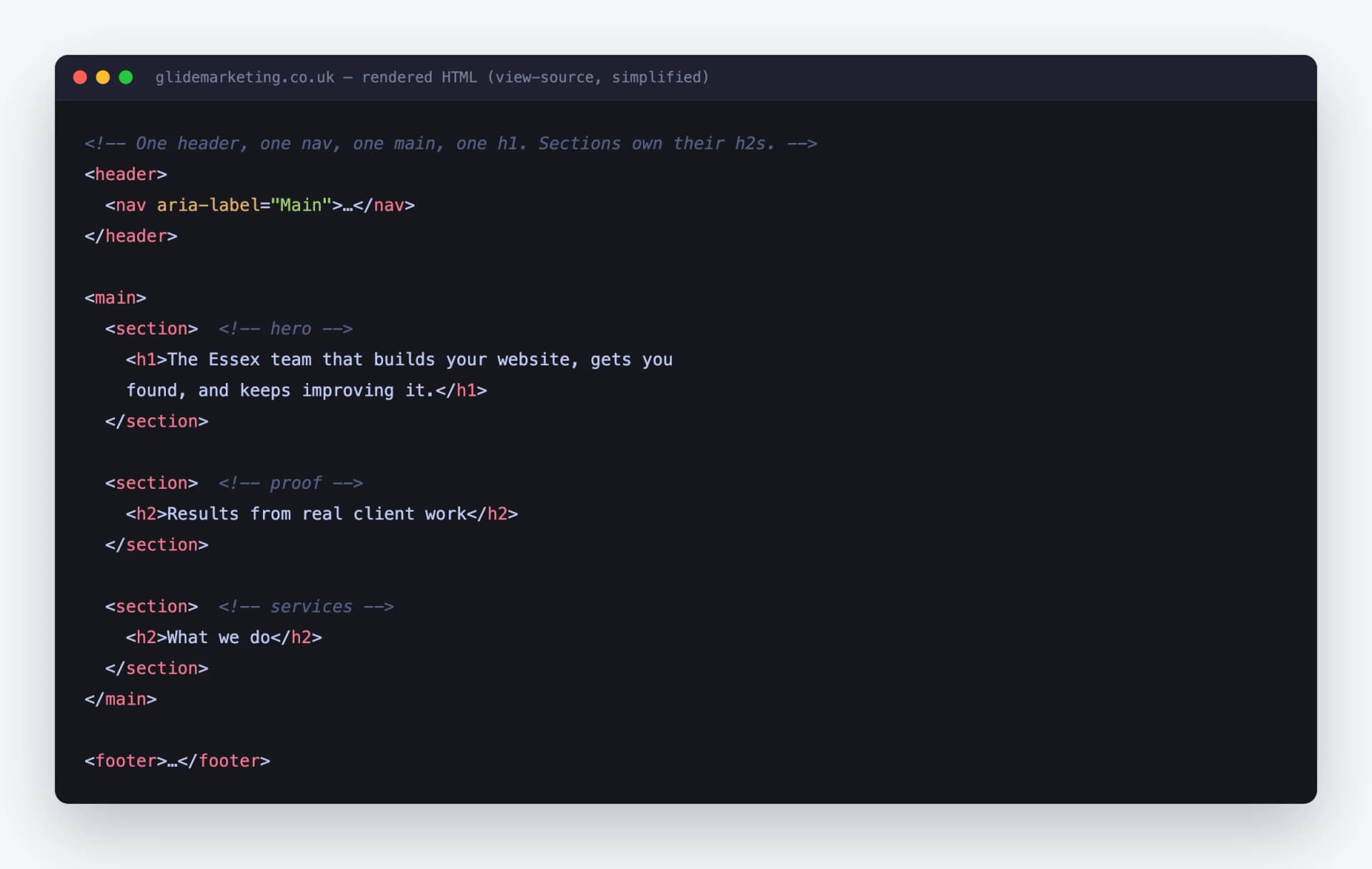
How to structure a page with semantic HTML so Google and AI search engines understand it, with our own homepage skeleton as the receipts.
Key Takeaways
- Semantic HTML means using tags that describe what content is (header, nav, main, article) instead of anonymous divs that tell Google nothing.
- The skeleton that works: one header, one nav, one main, exactly one h1, sections that each own an h2, one footer.
- It is not a ranking factor by itself, but it controls how easily Google finds your main content, and that shapes everything downstream.
- In 2026 it matters more, not less: AI search engines like ChatGPT, Copilot and Perplexity parse structure to decide what to cite. One Glide client has earned over 1,200 Copilot citations off the back of clean structure and schema.
- You can audit your own site in two minutes with View Source and a free headings checker. No tools to buy, no developer needed.
I build websites for a living, mostly in Next.js, and I spend a worrying amount of time fixing WordPress and Elementor sites where the code underneath is a pile of divs stacked on divs. The site looks fine to a human. To Google, it is a warehouse full of unlabelled boxes.
This guide is the one I wish I could send to every founder who edits their own site. No theory, no jargon for the sake of it. I will show you the actual structure of our own homepage, the handful of tags that matter, what each one says to a crawler, and how to check your site yourself in about two minutes.
What semantic HTML is, in plain English
Every web page is built from HTML tags. Some tags carry meaning and some do not.
A Semantic tags are labelled boxes. Google's own quality guidelines talk about separating main content from supplementary content and ads. Semantic HTML is how you draw those lines in the code itself, so the crawler does not have to work them out from scratch. Same content, same design, but one version comes pre-sorted and the other arrives as a jumble. To be clear, this is not a magic ranking switch. Google has said semantic HTML is not a direct ranking factor. What it does is remove friction. The easier your main content is to find, the more reliably it gets indexed for the right things. And as I will get to later, the machines reading your site in 2026 are not just Googlebot anymore. Here is the structure I use on every site we build, including our own. One header, one nav, one main, exactly one h1, sections that each own their h2, one footer. In code, the shape looks like this: That is the whole trick. A crawler hits this page and instantly knows where the chrome ends, where the content begins, what the page is about, and how the sub-topics break down. No guessing. The hero image above is our homepage seen through that lens. When you strip away the styling, a well-built page reads like the contents page of a book. If your page does not read like that in view-source, that is the gap to close. There are around a hundred semantic elements in HTML. You need about nine. Here is each one translated into what it tells a crawler. "This is introductory stuff." Usually your logo, navigation and maybe a tagline. One per page at the top level. Crawlers learn to skip past it to reach the content, which is exactly what you want. "These links are how you move around the site." This helps Google understand your site architecture and which pages you consider important. Your main menu belongs in here. "The content this page exists for starts here." One per page, no exceptions. If I could only fix one tag on most sites I audit, it would be wrapping the content in "This block is self-contained and would make sense on its own." Blog posts, news items, product cards. If you could lift it out and republish it elsewhere, it is an article. "This is one themed chunk of the page." Services, testimonials, pricing, FAQs. The rule I never break: every section gets its own heading, almost always an h2. A section without a heading is just a div with delusions. "This is related but not the point." Sidebars, pull-out tips, related links. Marking this clearly stops supplementary content diluting what your main content is about. "Housekeeping lives here." Contact details, legal pages, secondary links. For a local business it is also where your name, address and phone number sit consistently on every page, which feeds local SEO. "This image or chart belongs to the content, and here is what it shows." A captioned figure gives Google context that an alt attribute alone cannot. Every chart and screenshot in this post is wrapped in one. Practise what you preach and all that. The contents page of your document. One h1 stating what the page is about, h2s for major topics, h3s nested under their h2s. The levels must step down in order without skipping. I wrote a full guide on this, so if your headings are a mess, read my guide to correct heading structure for SEO next. It goes much deeper on hierarchy than I will here. Here is what I see when I open up a typical page-builder site. This is a simplified version of a real homepage hero I was sent to fix: To a visitor that renders as a normal hero. To Google it is six anonymous boxes. There is no heading, so the page topic is unclear. The "links" are divs with click handlers, so crawlers may never follow them. Nothing marks where the navigation ends and the content begins. Same hero, built properly: Websites that win you customers Identical on screen once styled. Completely different to a machine. The second version announces its topic, exposes a real crawlable link, and separates navigation from content. That is the entire job done in eight lines. Ten years ago semantic HTML was a "nice to have" that developers argued about on forums. Then AI search arrived and quietly raised the stakes. ChatGPT, Microsoft Copilot, Perplexity and Google's AI results do not rank ten blue links. They read pages, pick out the bits that answer a question, and cite a small number of sources. To do that, they parse structure. A page with one clear h1, sections with honest h2s, and main content cleanly separated from navigation is dramatically easier for these systems to quote accurately. A div-soup page forces the model to guess, and models do not cite pages they had to guess at. This is not theory for us. Here is real Bing Webmaster Tools data for one of our clients: That client did not buy ads or do anything exotic. Their site has clean semantic structure, proper headings, and schema markup on top. When Copilot answers questions in their niche, their pages are the ones it can confidently lift answers from, so they get the citation and the click. Schema markup (the JSON-LD layer that powers FAQ and review snippets) gets most of the attention, but schema sits on top of your HTML. If the underlying structure is a mess, you are putting a smart label on an unlabelled box. Semantics first, schema second. The honest pitch for doing this work: it is a one-off fix that keeps paying. You sort the structure once and every machine that reads your site afterwards, Googlebot or GPT, has an easier time. That suits me fine, because I would rather build things once and let them work in the background. It is the same reason I run most of this agency on AI. These come from real audits, mostly WordPress and Elementor sites. Check your own site against this list. You do not need paid tools or a developer for this. If your site fails those checks, the fix is usually smaller than you fear. On WordPress and Elementor it is mostly changing tag settings on widgets you already have. On a custom build it is a day of developer time at most. And if the structure is beyond saving, that is normally a symptom of a deeper build problem, which is the point where rebuilding properly becomes cheaper than patching. Not sure where your site stands? Run the two-minute check above, and if anything looks off, get in touch and I will give you the honest version, structure included. Mike McDonnell, Founder of Glide Marketing. More about how I work. No. Google has been clear that semantic HTML is not a ranking factor on its own. But it decides how easily Google finds and understands your main content, which affects how well your pages get indexed and which queries they show up for. Think of it as removing friction rather than adding points. One. Google can technically cope with more, but one h1 keeps the page topic unambiguous for crawlers, screen readers, and AI search engines. Every page I build has exactly one h1, and it says what the page is about in plain language. Yes, mostly without touching code. In Elementor, every heading widget has an "HTML Tag" setting where you choose h1 to h6, and container widgets let you set the tag to section, header, footer, or nav. Most Elementor messes I fix are headings picked for font size rather than meaning, and that is a settings change, not a rebuild. Yes, and this is where it earns its keep in 2026. AI search engines parse page structure to work out what a page is about and which part to quote. Clean structure plus schema markup is the pattern behind one of our clients earning over 1,200 Microsoft Copilot citations. An article is a self-contained piece that would still make sense on its own, like a blog post, a news story, or a product card. A section is a themed chunk of a page, like "Services" or "FAQs", and it should almost always have its own heading. If you could syndicate it elsewhere, use article. If it is a chapter of the current page, use section. Right click the page, choose View Page Source, and search for main, h1, and header. You want exactly one main and one h1. Then run a free headings outline checker, or use the Accessibility tree in Chrome DevTools, to see if the heading levels step down in order without skipping. No. Divs are fine for layout and styling, and every modern site uses plenty of them. The problem is only when divs are doing jobs that semantic tags should do, like a div acting as your main heading, your navigation, or a clickable button. Use divs to arrange things and semantic tags to label things. says "these are the links to get around the site". says "the actual content starts here, everything else is furniture". A heading tag like says "this is what the whole page is about".The page skeleton that works

One headline for the whole page
Services
...Results
...FAQs
...The tags that matter and what each one says to a crawler
. It is the single clearest signal of where the meat is.
Headings, h1 to h6
Div soup vs semantic: the same hero, two ways
Web Design in Essex
Why this matters more in 2026, not less

Common mistakes I fix every month
with an href. If it triggers an action, it must be a . Crawlers follow real links and may ignore JavaScript-only ones, and keyboard users cannot use a clickable div at all.How to check your own site in two minutes
Frequently asked questions
Is semantic HTML a direct Google ranking factor?
How many h1 tags should a page have?
Can I fix semantic HTML on a WordPress or Elementor site?
Does semantic HTML help with AI search engines like ChatGPT and Copilot?
What is the difference between article and section?
How do I check if my site uses semantic HTML?
Do divs hurt my SEO?
Keep reading

Not sure whether your site structure is the problem?
Tell us about your site on the form and you will get a straight answer on whether structure, headings or speed is what is costing you rankings, and what fixing it would cost. No hard sell.
Tell us what you're working on
Fill in the form and tell us what you're trying to achieve, who you're going after and what you can spend. Mike reads every one and comes back with a straight answer on whether we can help.
Tell us about your projectTakes two minutes. No calls, no diary tennis. A reply within one working day.