Schema Markup in Plain English: JSON-LD for Rich Results
What schema markup is, which JSON-LD a UK small business needs, and our live LocalBusiness schema explained field by field.
Key Takeaways
- Schema markup is a label maker for your content. Instead of hoping Google guesses that "5.0" is a rating and "Chelmsford" is your location, you tell it outright.
- JSON-LD is the format to use. It lives in one script block, separate from your design, and it is the one Google recommends.
- A UK small business needs about six schema types, not 800: LocalBusiness, FAQPage, BlogPosting, BreadcrumbList, Service, and Offer if you sell online.
- Never mark up reviews or ratings that are not real and visible on the page. Google hands out manual penalties for fake aggregateRating, and they hurt.
- Structured data is a big part of why AI assistants quote a site with confidence. One Glide client has earned over 1,200 Microsoft Copilot citations.
- Testing costs nothing: Google's Rich Results Test and the Schema.org validator are both free.
I ship schema markup on every website we build. Not because it is fashionable, but because it is one of the few SEO jobs where you do the work once and it keeps paying: star ratings in search results, FAQ dropdowns under your listing, and AI assistants quoting your business by name instead of a competitor's.
Most guides on this topic are written by tool vendors trying to sell you a generator, or they list every schema type that exists and leave you to figure out which ones matter. This one is different. I am going to show you the actual JSON-LD running on this site right now, explain it field by field, and give you the honest rules that keep you out of trouble.
What schema markup is, in plain English
Think of schema markup as a label maker for your website.
Your homepage probably says something like "Rated 5.0 by our clients" and "Serving Chelmsford and Essex". A human reads that and understands instantly. Google has to guess. Is 5.0 a rating, a version number, a price? Is Chelmsford where you are based or just a word in a sentence?
Schema markup removes the guessing. It is a small block of code, invisible to visitors, that says: this is a business, this is its name, this is its address, this is its rating, and here is how many people gave it. You are translating your page into a language search engines read with certainty.
The payoff is rich results. When Google trusts what your data means, it can show stars under your listing, expandable FAQs, breadcrumb trails, and prices. Same ranking position, noticeably more clicks. And in 2026 there is a second payoff that matters just as much, which I will get to: AI search engines lean on this data when deciding who to quote.
JSON-LD versus the old formats
One sentence on this, because it is settled: there used to be three formats (microdata and RDFa woven into your visible HTML, plus JSON-LD in its own script block), and JSON-LD won because it is self-contained, easy to maintain, and the one Google recommends, so use JSON-LD and move on.
Our own live schema, field by field
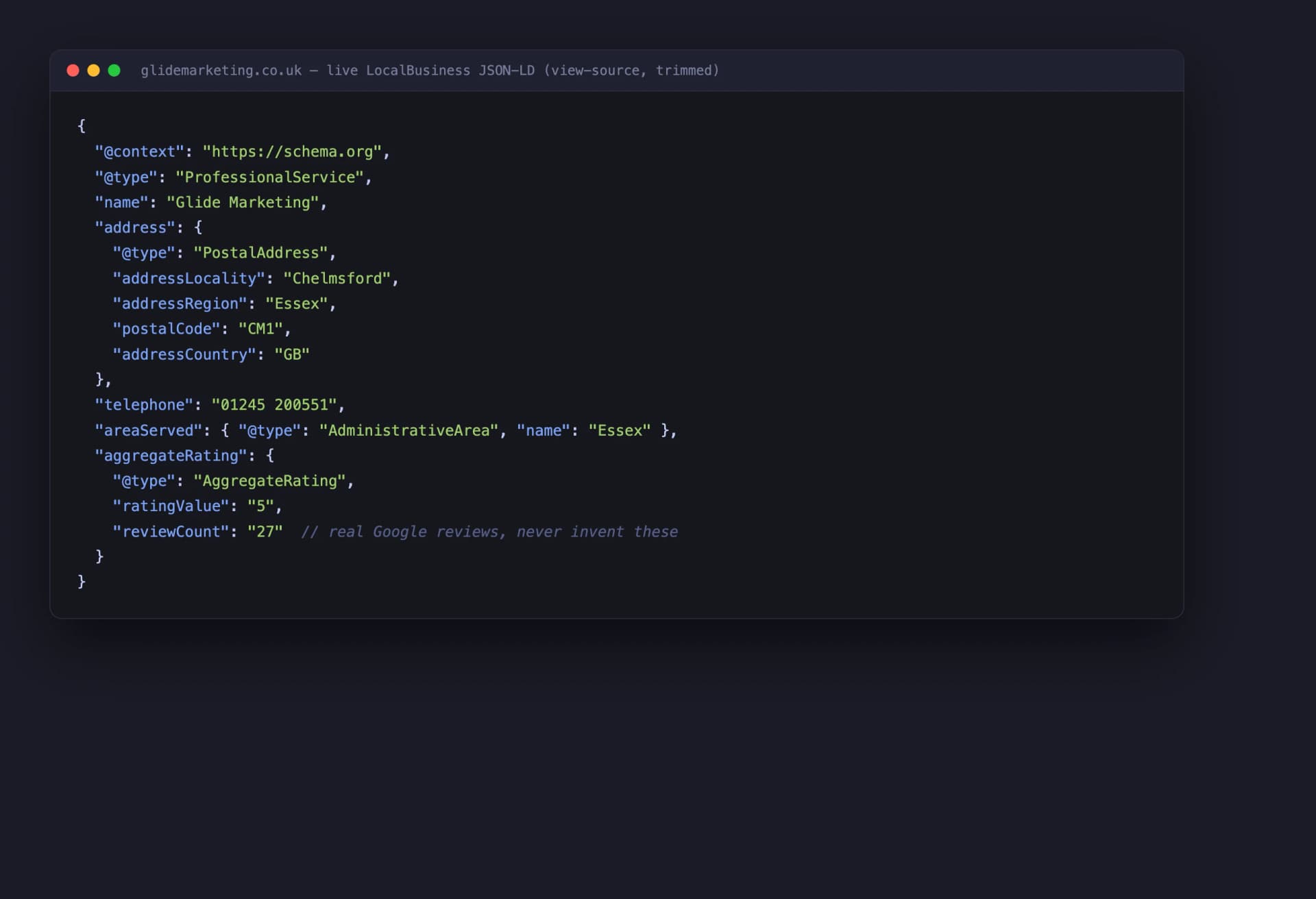
Here is the LocalBusiness schema running on glidemarketing.co.uk today. Not a mock-up, not "Example Ltd". This is what Google reads when it crawls our homepage.
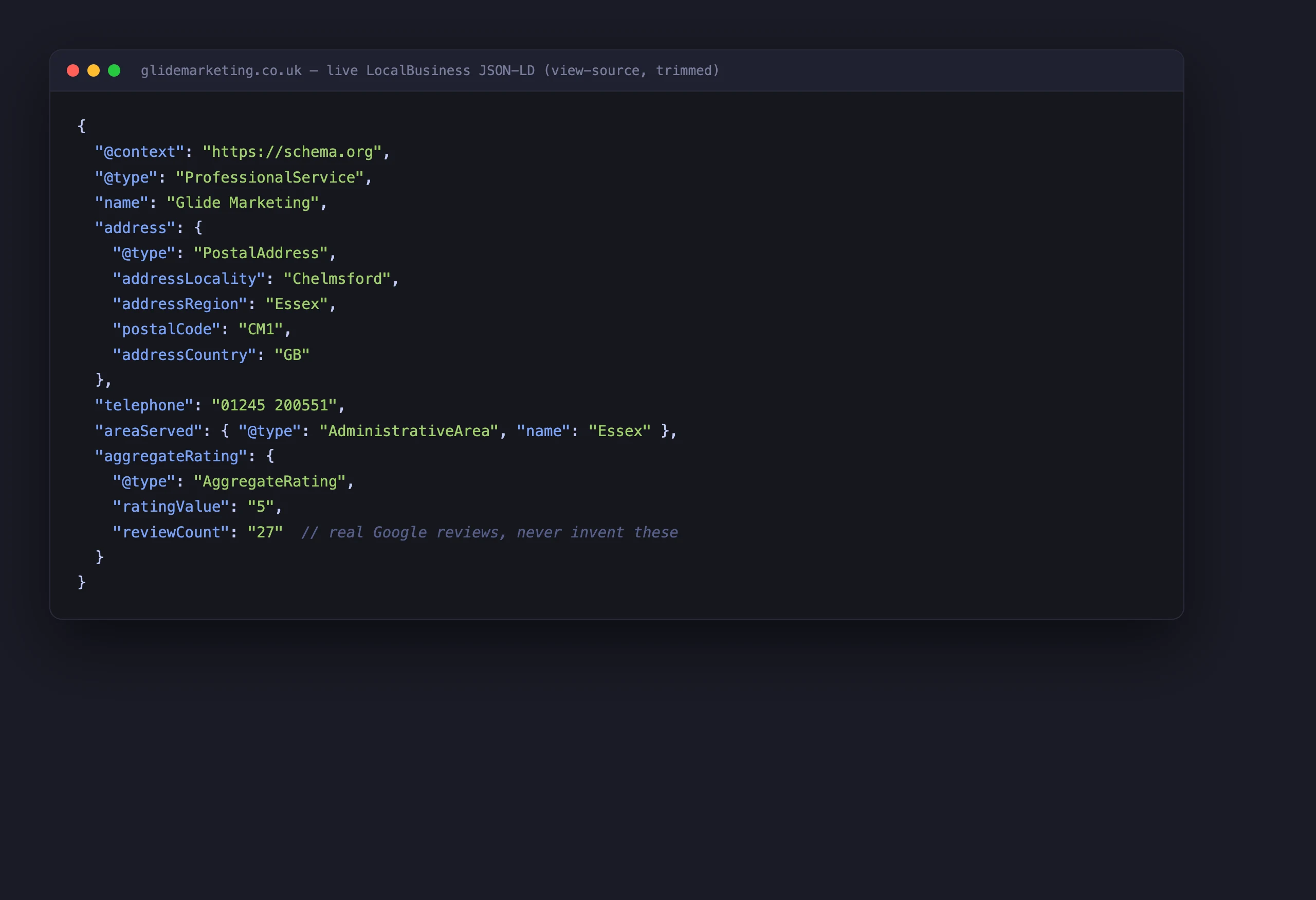
Walking through the fields that earn their place:
@type: ProfessionalService. This is a more specific flavour of LocalBusiness. If a closer match exists for your business (Dentist, Plumber, Restaurant), use it. Specific beats generic.
name and url. Exactly as they appear on your Google Business Profile. Consistency across your website, schema, and Google listing is the whole game in local SEO. One version of your name, everywhere.
address. A PostalAddress object with our real Chelmsford address, matching our Google Business Profile to the letter. If your schema says one address and your Google listing says another, you have introduced doubt where the entire point was certainty.
telephone. The same number a customer would ring. Obvious, but I have audited sites where the schema held a number that was disconnected two years ago.
areaServed. The towns and regions we genuinely work in: Chelmsford, Braintree, Colchester, and Essex more widely. This helps search engines connect you to "near me" and "in [town]" searches beyond your front door. List places you really serve, not every town in the county.
aggregateRating. A 5.0 rating from 27 reviews. Those are our real Google reviews, and the rating is displayed on the page itself. Both halves of that sentence matter, and the next section explains why.
The schema types a UK small business needs
The schema.org vocabulary has over 800 types. You need about six. In priority order:
1. LocalBusiness or ProfessionalService. Your homepage, once. This is the foundation: who you are, where you are, what you do, how to contact you. If you only ever add one piece of schema, make it this one.
2. FAQPage. For any page with a visible question-and-answer section. This is the one that produces those expandable dropdowns in search results, and it doubles as ready-made answers for AI assistants.
3. BlogPosting with a Person author. Every article, with a real named author linked to an author page. Google and the AI engines increasingly care who wrote something. An article by "admin" carries less weight than one by a named person with a track record.
4. BreadcrumbList. Sitewide. It gives Google your site hierarchy and replaces the grey URL in search results with a readable trail. It also reinforces the structure you build with internal linking, since both describe how your pages relate.
5. Service. One per service page: what the service is, who provides it, what area it covers. It connects your individual offerings to your main business entity.
6. Product with Offer. Only if you sell online. Price, availability, and reviews in the search results. For ecommerce this is non-negotiable; for everyone else, skip it.
That is the list. Recipe, Event, Movie, MedicalCondition and the other 800-odd types exist for businesses that are not yours. Adding schema you do not need is not extra credit, it is extra surface area for errors.
The honesty rules
This is the section the tool-vendor guides leave out, and it is the most important one in this post.
Never invent reviews or ratings. Google issues manual actions for fake or unverifiable aggregateRating markup, and a manual action strips rich results across your entire site, not just the offending page. I have seen sites marked up with "4.9 from 200 reviews" when their Google Business Profile showed 11. That is not a clever shortcut, it is a penalty with a fuse on it.
Only mark up what is visible on the page. This is Google's actual guideline and the simplest rule of thumb you will ever get. If the rating is in your schema, the rating must be on the page where a visitor can see it. Same for FAQs, prices, and opening hours. Schema describes your content, it does not replace it.
Keep it consistent. Your schema, your visible page, and your Google Business Profile should all tell the same story. The 27 reviews in our markup are the 27 reviews on our Google profile. When those numbers drift apart, update the schema or remove it.
Schema is a trust system. Use it truthfully and search engines reward you with visibility. Game it and they take the toys away.
A worked example: a minimal FAQPage
Here is the smallest useful piece of schema you could add this afternoon. It marks up one question and answer that already appear on the page:
That whole block goes in the head of your page, or anywhere in the HTML. Add more questions by adding more objects to the mainEntity array. The text in the schema should match the text on the page, lightly trimmed is fine, contradictory is not.
How schema feeds AI search
Here is the part that changed my view of schema from "nice to have" to "every build, no exceptions".
AI search engines like ChatGPT, Copilot and Perplexity do not just rank pages, they quote them. And before quoting a business's rating, address, or price, they want confidence they have understood it correctly. Structured data is exactly that confidence. A page that declares "this business, this rating, this area" in machine-readable form is far safer to cite than one where the model has to infer everything from prose.
We watched this play out with one of our clients. Clean structure, proper schema on every page, and the result is over 1,200 citations in Microsoft Copilot answers. That is their business being named in AI responses while competitors with messier markup go unmentioned.

One thing to be clear about: schema sits on top of semantic HTML, it does not replace it. Sort the structure first, then label it. A beautifully marked-up page built on a pile of anonymous divs is a fresh coat of paint on a wonky wall.
How to test your schema, free
Two tools, both free, no account needed:
Google's Rich Results Test (search.google.com/test/rich-results). Paste your URL and it tells you which rich results your page is eligible for and which errors are blocking them. Errors block features, so fix every one. Warnings are usually optional fields, so use judgement.
The Schema.org validator (validator.schema.org). This checks your markup against the full vocabulary, including types Google does not currently show in results. Useful for catching syntax mistakes the Google tool glosses over.
My routine: run both on the homepage, one service page, and one blog post. Those three templates cover most of what a small business site ships. If they pass, the rest usually does too. There is a fuller checklist in my technical SEO playbook if you want to go deeper than schema.
How this site does it, and why that is the point
One last thing worth stealing. None of the schema on this site is hand-written per page. It is generated automatically from the content itself. The FAQ section you can see further down this post and the FAQPage JSON-LD that Google reads are built from the same single source of data. The author byline and the Person schema come from one author record.
That matters because the failure mode of hand-written schema is drift. Someone updates the page, nobody updates the markup, and six months later your schema is confidently describing a service you renamed in March. Generated schema cannot drift, because there is nothing separate to forget.
That is the AI-native way of working that runs through everything we do at Glide, and it is the same thinking behind our SEO service: build the system once, properly, and let it maintain itself while you get on with running the business.
If you want to know whether your own schema is helping you, hurting you, or simply missing, get in touch and we will take a look.
Mike McDonnell, Founder of Glide Marketing. More about how I work.
Frequently asked questions
What is schema markup in simple terms?
Schema markup is a small block of code that labels what your content is, so search engines do not have to guess. Your page might say "5.0 from 27 reviews" and a human gets it instantly. Schema tells Google the same thing in a format it can read with certainty: this is a rating, this is the count, this is the business it belongs to.
Is schema markup a Google ranking factor?
Not directly. Google has said structured data is not a ranking factor on its own. What it does is make you eligible for rich results, the enhanced listings with stars, FAQs and breadcrumbs, which earn more clicks from the same position. It also helps AI search engines quote you with confidence, which is where a lot of new traffic comes from in 2026.
Which schema types does a small business need?
Six, in rough priority order: LocalBusiness (or ProfessionalService) on your homepage, FAQPage on pages with visible FAQs, BlogPosting with a Person author on articles, BreadcrumbList sitewide, Service on your service pages, and Product with Offer if you sell online. The other 800 or so types in the schema.org vocabulary are safe to ignore for most businesses.
Can I be penalised for schema markup?
Yes, if you lie in it. Marking up reviews you do not have, inflating an aggregateRating, or putting content in schema that is not visible on the page can all earn a manual action from Google, which strips your rich results across the whole site. The fix is simple: only mark up things that are true and that a visitor can see on the page.
Do WordPress SEO plugins handle schema for me?
Partly. Yoast and Rank Math output decent Article and basic Organization schema by default, which is better than nothing. But they cannot know your real review count, your service areas, or your FAQ answers unless you configure them, and most sites never do. Check what your plugin outputs with the Rich Results Test before assuming you are covered.
How do I test my schema markup?
Two free tools. The Google Rich Results Test (search.google.com/test/rich-results) tells you whether your page is eligible for rich results and flags errors that block them. The Schema.org validator (validator.schema.org) checks your code against the full vocabulary, including types Google does not show. Run both, fix the errors, ignore most of the warnings.
What is the difference between JSON-LD and microdata?
Microdata and RDFa are older formats woven into your visible HTML, attribute by attribute, which makes them fiddly to write and easy to break when you redesign. JSON-LD sits in one self-contained script block in the head of the page, separate from your layout. Google recommends JSON-LD, and there is no good reason to choose anything else on a new build.