Internal Linking for SEO: The Hub and Cluster System
The exact hub and cluster internal linking system we use on every Glide site, with our real cluster map and the money-page logic most guides skip.
Key Takeaways
- Internal links are the only links in SEO you fully control. They are free, instant, and most sites waste them, which makes them an easy win.
- The hub and cluster system: one big hub guide per service, spoke guides that link up to the hub and across to two or three siblings, and the hub linking down to the service page that wins enquiries.
- Your services are your hubs. Pick hubs based on what you sell, not on what sounds clever.
- Three to five contextual links per post beats twenty stuffed ones. Use descriptive, varied anchor text and never "click here".
- Find orphan pages by comparing a crawl against Search Console. A page nothing links to may as well not exist.
- This post is itself a spoke in our Technical SEO Playbook cluster, so you can see the whole system running on a real site.
Most internal linking guides are the same article wearing a different logo. They explain what an internal link is, mention PageRank, show you a pyramid diagram, and send you on your way.
What they never show you is a real site's cluster map. Which pages link where, why, and which page is supposed to make the money at the end of it all. I went and read the top ranking guides before writing this, and not one of them shows you their own site's linking structure or talks about where the enquiries come from.
So that is what this post does. I am going to show you the exact hub and cluster system we use on every Glide site, including this one. By the end you will be able to map your own site in an afternoon. And here is the nice part: once the map exists, the system mostly runs itself. Every new post slots into a known spot. No agonising, no spreadsheet of shame.
Why internal links beat most link building
Backlinks get all the glory in SEO. For most small business sites, internal links quietly do more. Three reasons.
You control them. Getting a backlink means asking someone else to link to you, and hoping. Placing an internal link takes ten seconds, needs nobody's permission, and Google picks it up on the next crawl. It is the only part of link building where you hold the pen.
They are free. No outreach, no guest posts, no "quick favour" emails. If you have more than about ten pages, you are sitting on link equity you have already paid for. Most owners just never spend it.
Most sites waste them. Nearly every site I audit has the same pattern: a decent blog full of posts that link to nothing, a services page nothing links to, and a scattering of "click here" anchors. If your competitors are doing that, and they almost certainly are, tidy internal linking is one of the cheapest advantages available to you.
There is a mechanical reason this works. Authority flows through internal links in much the same way it flows through backlinks. When a good backlink lands on one of your blog posts, your internal links decide where that authority goes next. With no internal links, it just sits there in the post, doing nothing for the pages that pay your bills.
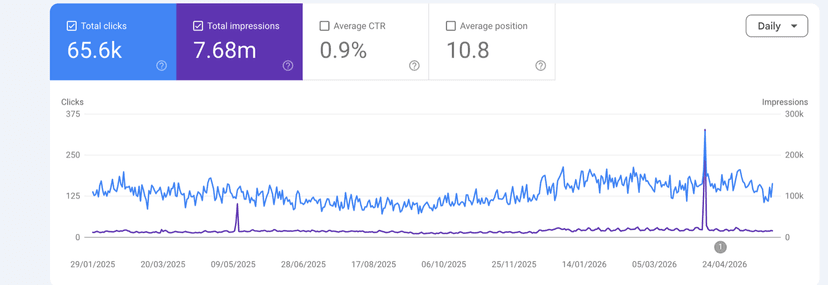
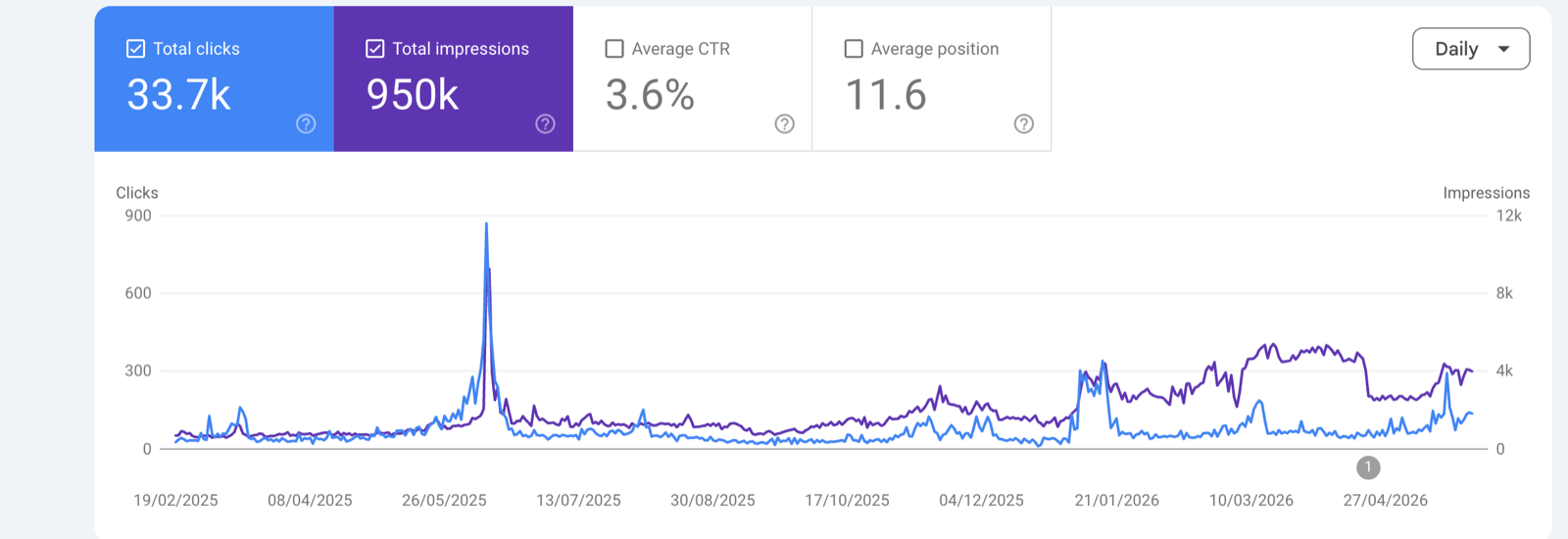
This is not theory for us. Here is one of our clients' Search Console graphs, built with exactly two ingredients: useful content and disciplined internal linking. No paid link building at all.
The hub and cluster system
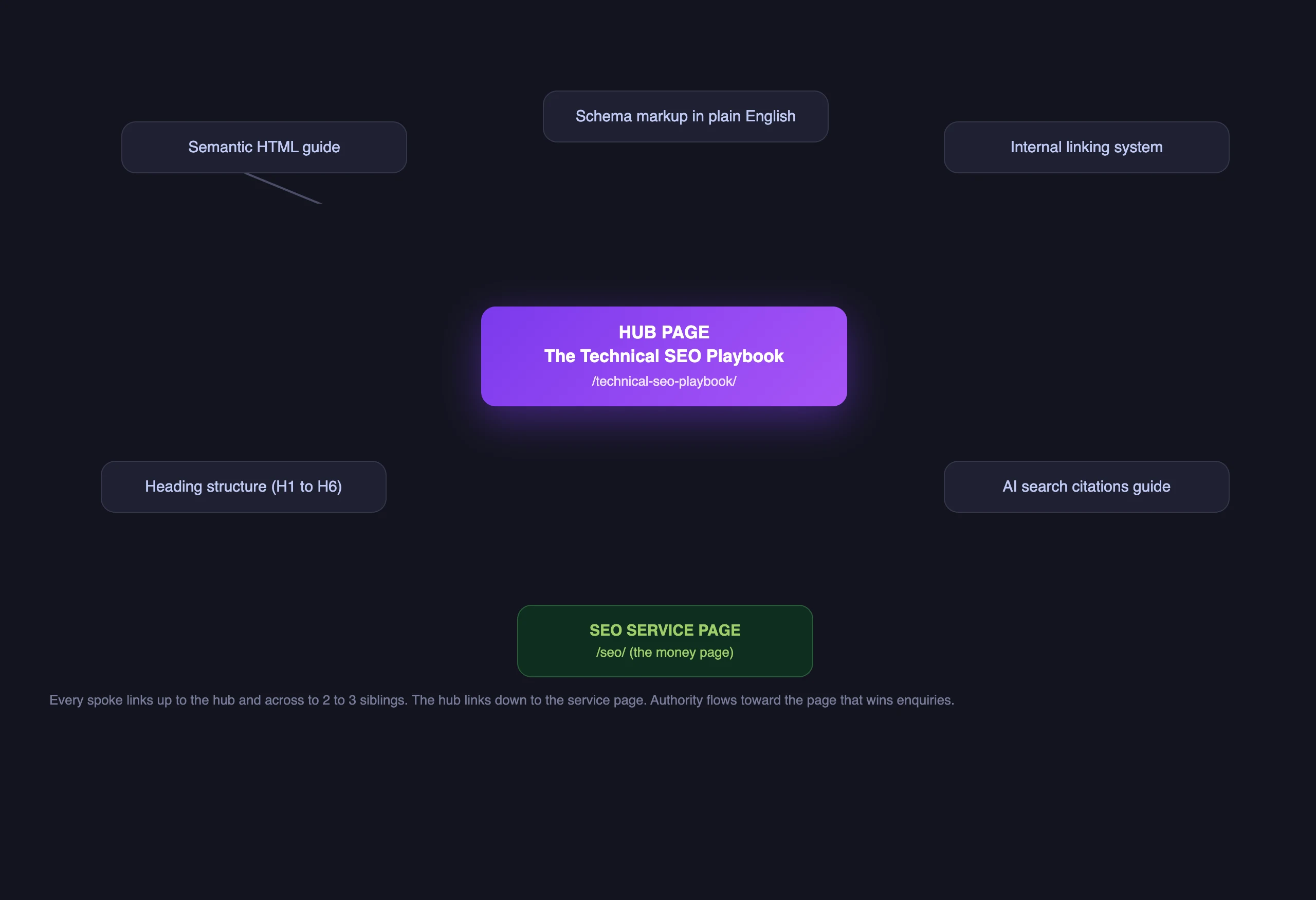
Here is the structure we build on every site. It has three types of page and four linking rules.
The hub is one big guide that covers a whole topic properly. Think of it as the table of contents for everything you know about that subject. Ours for this topic is the Technical SEO Playbook.
The spokes are the specific guides underneath it. Each one goes deep on a single job: heading structure, page speed, internal linking (hello), and so on.
The money page is the service page where people enquire. For this cluster, that is our SEO service page.
And the four rules that connect them:
- Every spoke links up to the hub.
- Every spoke links across to two or three sibling spokes where it genuinely helps the reader.
- The hub links down to every spoke.
- The hub links down to the money page.
That last rule is the one almost every guide skips, and it is the one that pays for everything else. Here is the logic.
Blog posts are good at earning rankings and backlinks, because people link to useful guides. But they are bad at winning enquiries, because someone reading "how headings work" is learning, not buying. Service pages are the opposite: great at converting, terrible at attracting links, because nobody links to a sales page out of kindness.
The hub bridges the two. Authority earned anywhere in the cluster flows up to the hub, and the hub hands it to the SEO service page, which is the page we want ranking for commercial searches. The guides do the earning, the money page does the converting, and the links are the plumbing between them. Build the plumbing once and every new post you publish makes the money page a little stronger, without you doing anything extra.
How to pick your hubs: your services are your hubs
This is where people overthink it. You do not need a content strategist or a keyword brainstorm to choose your hubs.
Your services are your hubs. One hub per thing you sell. If you are a plumber who does boiler installs, bathroom fitting and emergency callouts, those are your three hubs. Each hub is the complete guide to that topic, and each one points at the matching service page.
The test for whether a topic deserves a hub is simple: does it have a money page underneath it? If a topic cannot ever lead to an enquiry, it does not need a hub. It might still be worth a post, but it joins an existing cluster rather than starting a new one.
This also tells you what to write next, forever. Every new post should be a spoke for one of your hubs. If an idea does not fit any hub, that is the system politely telling you it probably will not bring you customers.
Anchor text rules
Anchor text is the clickable wording of the link, and Google reads it as a description of the page on the other end. Three rules cover almost everything:
- Be descriptive. Say what the page is about in plain words. "Our guide to heading structure" beats "this post" every time, because it tells Google and the reader exactly what they are getting.
- Vary the wording. If ten links all say "internal linking strategy" in exactly those words, it reads like a robot built it, because one did. Mix it up the way you would in normal speech: "how we structure internal links", "our linking system", "this guide to internal links".
- Never "click here". It describes nothing, it passes no meaning, and it wastes the most valuable part of the link. Same goes for "read more" and "learn more" in body copy.
One more habit worth stealing: link from within sentences, not from lists bolted onto the end of a post. A link placed mid paragraph, at the moment the reader wants it, carries more weight with Google and gets clicked more by humans. Those bolted-on "related posts" widgets are better than nothing, but contextual links in the body are the ones doing the real work.
The orphan page problem
An orphan page is a page with no internal links pointing at it. It might be in your sitemap, it might even be indexed, but as far as your site structure is concerned it does not exist. No authority flows into it, readers cannot stumble onto it, and Google quietly learns to treat it as unimportant.
Orphans happen by accident. A post gets published in a hurry, a service page gets added and nobody links it from the navigation, an old page survives a redesign but loses all its links. I find them on almost every audit.
Finding yours takes about twenty minutes:
- Crawl your site with Screaming Frog (free up to 500 URLs). The crawl can only find pages that links lead to, which is exactly the point.
- Open Search Console, go to Indexing then Pages, and export the list of pages Google knows about. Grab your sitemap list too.
- Compare the two. Any page Google or your sitemap knows about that the crawl never reached is an orphan.
The fix is rarely complicated. Find the cluster the orphan belongs to, add a link from the hub and one or two relevant spokes, and it rejoins the family. If you cannot find any page that should naturally link to it, ask the harder question: why does this page exist at all?
How many links per post? Three to five beats twenty
The temptation, once you understand that links pass authority, is to cram them in everywhere. Resist it.
The value a page passes is shared across the links on it, so twenty links each pass a sliver while four pass a meaningful slice. Stuffed posts also read terribly, and a reader who feels herded stops trusting the links entirely.
Our rule on every Glide post: three to five contextual links in the body, each one earning its place. Up to the hub, across to the siblings that genuinely help, and that is usually it. Navigation and footer links sit on top of that, but the body links are the ones we plan.
A decent test for each link: if the reader clicked it right now, would they thank you? If yes, keep it. If it is only there for Google, cut it.
This post is the worked example
Here is the part I promised at the top. You are inside the system right now.
This post is a spoke in our Technical SEO cluster. It links up to the Technical SEO Playbook, which is the hub. It links across to its siblings, like our guides to semantic HTML for SEO and correct heading structure, because if you care about internal linking you will probably care about those too. And the hub links down to the SEO service page, which is where the enquiries land.
Every rule in this post is being applied by this post. Count the body links: you will find a handful, all contextual, all descriptive, none saying "click here". If this guide earns a backlink or two, that authority will flow up to the playbook and on to the service page, exactly as drawn in the diagram. The system does the work; I just wrote the post and slotted it in.
That is really the whole pitch for hub and cluster linking. It is not a tactic you keep performing. It is a structure you build once, and then every piece of content you ever publish drops into place and pulls in the same direction. Map your hubs this week, fix your orphans, tighten your anchors, and let it compound while you get on with running the business.
Mike McDonnell, Founder of Glide Marketing. More about how I work.
Frequently asked questions
What is internal linking in SEO?
Internal linking means linking from one page on your website to another page on the same website. Those links help Google find your pages, understand how they relate to each other, and decide which ones matter most. They also pass authority between pages, the same way backlinks from other sites do.
How many internal links should a blog post have?
Three to five contextual links in the body of the post is the sweet spot for most small business sites. Each one should genuinely help the reader and point somewhere relevant. Twenty stuffed links dilute the value each one passes and make the post harder to read, which helps nobody.
Are internal links better than backlinks?
They do different jobs, but internal links are the better place to start because you control them completely. Backlinks need outreach, luck, or budget. Internal links are free, instant, and most of your competitors waste them. Once a backlink does land, your internal links decide where that authority flows next, so the two work together.
What is a hub page (or pillar page)?
A hub page is one big guide that covers a whole topic, like a complete technical SEO playbook. Smaller, more specific guides (the spokes or cluster pages) all link up to it, and it links back down to each of them. The hub then links to the service page you sell from, so the authority the cluster earns ends up on the page that wins enquiries.
How do I find orphan pages on my website?
Crawl your site with a tool like Screaming Frog (free up to 500 URLs) to get a list of every page reachable through links. Then compare that against the pages Google knows about in Search Console under Indexing then Pages, plus your sitemap. Anything in the sitemap or Search Console that the crawl never reached through a link is an orphan, and it needs at least one internal link pointing at it.
What anchor text should I use for internal links?
Describe the page you are linking to in plain words, the way you would explain it to a friend. "Our guide to heading structure" tells Google and the reader exactly what is on the other end. Vary the wording from link to link rather than repeating the same exact phrase, and never use "click here", because it describes nothing.
Do internal links pass PageRank?
Yes. Authority flows through internal links in much the same way it flows through backlinks. That is the whole point of the hub and cluster system: backlinks and rankings earned by your guides flow up to the hub, and the hub passes that authority down to the service page you want to rank for commercial searches.